If you are new to leatherwork, the hardest part is often knowing what to make first. A good beginner project is small, uses a scrap or two of leather, and teaches you one or two skills properly: cutting a clean line, punching straight stitch holes, saddle stitching, and finishing an edge.
We have drawn ten simple patterns that do exactly that. They are all free to download from our free patterns page, and each one is a single A4 PDF with the pieces at full size, stitch holes marked and short making notes on the sheet.
The ten patterns
- Folded key fob: one strip of firm leather and a rivet. The best first project there is.
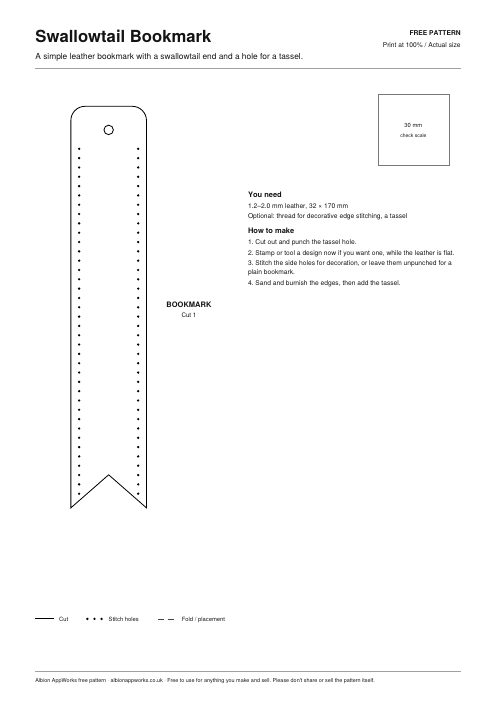
- Swallowtail bookmark: practise cutting a long straight edge and a clean V.
- Cable tidy strap: learn to set snaps.
- Stitched round coaster: a gentle introduction to stitching a curve.
- Single pen sleeve: two layers stitched round three sides.
- Three-layer card holder: a proper everyday-carry piece with two pockets.
- Slip-in glasses case: bigger curves and a thumb notch.
- Snap corner valet tray: no stitching at all, just folds and four snaps.
- Luggage tag with window: an inner cut-out and a strap.
- Slim bifold wallet: the step up, with pockets on both sides.
What you need to get started
You do not need a big kit. For all ten patterns, a sharp knife or rotary cutter, a cutting mat and steel rule, a 4 mm pricking iron (or a stitching wheel and awl), two harness needles, waxed thread, an edge beveller and some sandpaper will do. The key fob, valet tray and cable tidy also need a rivet or snap setter.
As for leather, most of these suit 1.0 to 1.6 mm leather. The key fob and valet tray want something firmer, around 2 to 3 mm, so they hold their shape. Each pattern sheet lists the thickness that works best.
Which one to make first
Start with the key fob or the bookmark. They use very little leather, so a mistake costs pennies, and they give you a feel for cutting and edge finishing before you add stitching. Then move to the coaster or pen sleeve to practise stitching, and the card holder once your stitch line is looking even.
Before you cut: print each pattern at 100% or “Actual size”, then measure the 30 mm square on the sheet. If it is not exactly 30 mm, your printer has scaled it. Our guide to printing patterns at actual size explains how to fix that.
Can I sell what I make?
Yes. You are welcome to make and sell items from these patterns. We only ask that you do not share or sell the pattern files themselves; point people to the free patterns page instead.
Cutting on a laser?
Every pattern is drawn as clean vector lines, so you can turn it into a laser cut file with Laser-Ready DXF, which converts a PDF into DXF or SVG and closes any gaps in the outlines. If you want to lay out your own stitch holes round curves, Stitch Line Studio does that too. Both are free to try in your browser.